

Leads contacted within the first five minutes are 21 times more likely to qualify than leads contacted after thirty minutes.
A lot of service businesses know this stat, but many don't act on it. Real-world response times sit in hours (or days!) because often the people contacting leads are also in charge of intake, billing, client work and everything else that happens during a working day.
The interesting shift in 2026 is that the technology to actually close that gap has matured. Claude Managed Agents, released in beta by Anthropic in April, are a new piece of infrastructure worth understanding if you’ve ever looked at a Make scenario and thought:
“This is going to break the moment a lead does something the workflow didn’t predict.”
This article serves as a practical introduction. What Managed Agents actually are, where they earn their place against tools like Make, Zapier, and n8n, and where the honest answer is still “stick with the workflow tool you’ve got.”
What are Claude Managed Agents?
A Managed Agent is a pre-built, configurable agent that lives inside Anthropic’s infrastructure. Instead of writing your own loop that calls the Claude API, parses the response, dispatches tools and stitches state across turns, you give Anthropic a configuration, and they run the loop for you. In Lemoine's terms, a Managed Agent is like hiring Anthropic to be your AI's operator; you describe what you want it to do, and they keep it running.
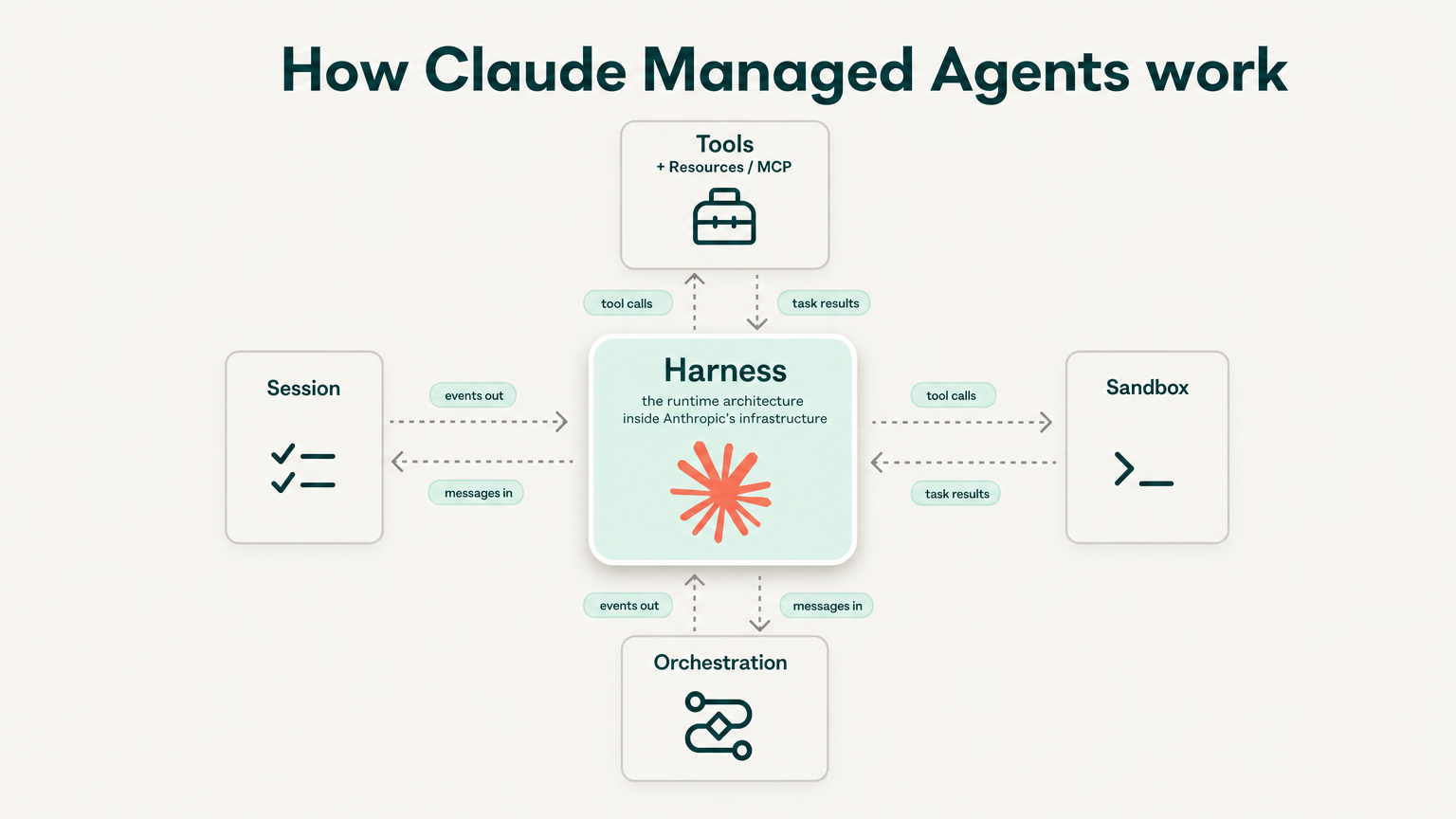
Four pieces sit at the centre of the model:
1. Agent
A reusable, versioned configuration: model, system prompt, tools, MCP servers and skills. Created once, referenced by ID across many sessions.
2. Environment
A container template. Pre-installed packages, networking rules and mounted files. The runtime your agent operates inside.
3. Session
A running instance that ties an agent to an environment and performs a specific task. Sessions hold state. Filesystem changes and conversation history persist across turns.
4. Events
The bidirectional message stream. Your application sends user events in. The agent emits events as it works, streamed via server-sent events.
The mental model is closer to “give the model its own laptop and let it work” than “fire an API call and parse the response.”
Sessions can run for minutes or hours. They re-enter a workflow eight minutes after a missed call without losing context, and they can read the lead’s earlier SMS, decide the right next message, and send it via a wired-up MCP server.
Currently in beta, with all requests requiring the managed-agents-2026-04-01 header. Outcomes and multi-agent features sit in research preview behind a waitlist.
Why is Speed-to-lead the Obvious First Use Case?
Most service businesses have already done the hard part. Their Meta Ads, Google Ads and inbound forms all push leads into a CRM like HubSpot or GoHighLevel. The integration is there. Leads are landing. What’s missing? The response.
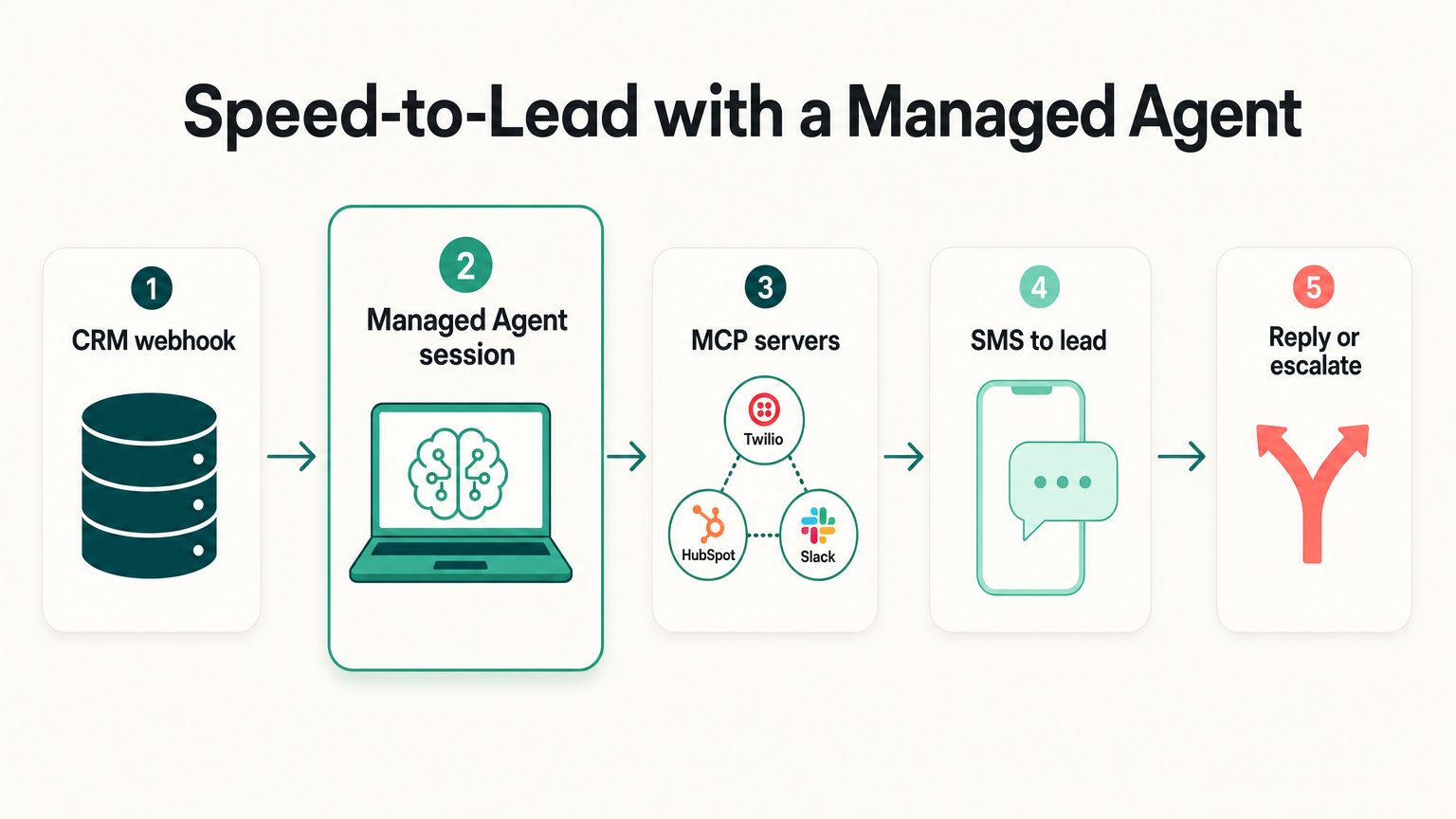
Here’s the architecture we’d actually build for a service-business client tomorrow: A new contact appears in the CRM. That fires a webhook. The webhook starts a Managed Agent session. The session reads the lead’s form data, identifies the matter type or service, drafts a personalised SMS, and sends it through a Twilio MCP server. Lead replies. The session reads the reply, books a call slot if the lead is ready, or sends a follow-up message if they’re not.
If no response comes back within a defined window, the session writes a task back to the team and disengages. A human picks up the phone. The agent didn’t try to be clever about something it couldn’t handle. It was handed over.
Three things make this kind of work suit Managed Agents specifically:
- The session is stateful, which means the agent remembers what it just sent without you having to manage a session store.
- The vault model means each client’s credentials live in their own scoped vault, so a single agent can run across multiple clients without leaking credentials between them.
- The MCP connector means you can wire in any tool that exposes an MCP server (Twilio, HubSpot, Slack, ClickUp) without writing custom integration code.
Because the agent is reasoning over each lead instead of routing through a static decision tree, it handles the awkward cases that workflow tools choke on. This includes the lead who asks a question instead of replying with a yes or no, the lead whose form submission has a typo in the email field and the lead who mentions a different matter type to the one they ticked.
Where Do Managed Agents Earn Their Place?
Most simple workflows are still better served by a basic automation and an API call. If your speed-to-lead system is “send an SMS the moment a Meta lead form is submitted,” a Make scenario with one Twilio module will do that job at lower cost, with a clearer UI, and without you needing to learn a new platform.
The threshold where Managed Agents start to earn their keep is when work has to combine multiple sources of context.
APIs and MCP connectors. External enrichment, such as web search or directory lookups. Internal context about the campaign, the client’s positioning, and what the product or service actually is. When all of that has to live in one stateful place to do the job properly, a Managed Agent’s secure container starts to look like the right shape of tool.
The session-end pattern is also worth understanding. You can finish each session by asking the agent to capture what worked, what didn’t and any patterns it noticed. Those captures feed back into a periodic update of the agent’s configuration. The agent doesn’t fine-tune itself in any machine learning sense. The configuration improves over time, version by version, because someone reads what the agent surfaced and rolls the lessons forward.
The cleanest way to explain when this matters is the moment your Make scenario contains a step that says “Claude API: decide which branch to take next,” you’ve already accepted that you need the model in the loop. At that point, you should consider whether you’d be better off running an agent end-to-end rather than glueing the model into a workflow it has to keep escaping from.
Where Do Make.com And n8n Still Win?
Visibility.
Make, n8n and trigger.dev holds a meaningful advantage in how easy they are to debug. You can see the workflow as a diagram. You can click into a failed run and inspect the data at the exact moment the run broke. You can rerun a single node. The visual model is genuinely useful.
Managed Agents don’t have that yet. You debug by reading the event stream, inspecting the session’s filesystem, and reasoning about what the agent decided to do. Claude Code is a competent co-pilot for this work, but the workflow is closer to debugging code than fixing a node in a flowchart. Service-business owners who don’t have technical resourcing on their team will hit this wall fast.
The trade-off is real and worth naming up front.
Drag-and-drop tools take longer to build and are easier to fix. Agents take less time to build, especially the ones that involve any decision-making, and require more skill to fix when they break. Heavy on integration work at the start, lighter once configured, and very scalable once you’re past the setup phase. That’s the actual upside, and it’s a real one.
If you don’t have anyone on your team who can read a stack trace and reason about why an MCP server returned an unexpected response, the better answer is probably to stay with workflow tools and pay the cost of needing more of them.
What Have We Built Inside LeadtreeOS So Far?
Our marketing agency has already built plenty of agent-shaped systems which run inside our own operating system, but nothing yet running on Anthropic’s managed infrastructure.
The closest example is our trend researcher. It’s a custom skill inside LeadtreeOS that pulls comments from Reddit, X, TikTok, YouTube and Instagram across a query term and surfaces what real people are saying in the Australian legal space. Triggered automatically when we start brainstorming new content for a client.
An interesting decision inside the trend researcher is the per-query routing. The prompt biases the agent toward platforms that are indexing higher for the query, defined as platforms with more comments, more relevance, and more current activity.
Make or Zapier could, in theory, replicate this with a hand-maintained quality table per platform per query type or with an embedded Claude API call that does the routing decision. The first option requires constant maintenance. A second option means you’ve already accepted that you need the model in the loop, which is the argument for switching to an agent in the first place.
The version we’d port to a true Managed Agent runs as a weekly cron. Standalone, stateful, with a vault holding the platform credentials. Captures what it found, writes back to our content planning brief and improves its query selection over time. That’s the next build, not the current one.
How Do You Tell if Managed Agents Fit Your Business?
Three signals suggest you’ve crossed the threshold:
1. You’re already paying for a Claude or OpenAI API call inside a Make or Zapier scenario
That step is the model doing real work for you. If it’s making decisions a human would otherwise have to make, you’re paying for the inference and not getting the benefit of letting it sit at the centre of the workflow.
2. Your speed-to-lead system has more than three branching outcomes
Send an SMS, route to a team member, book a call, escalate to a senior, send a different SMS depending on the matter type. Once branching gets richer than a flowchart can hold, agent reasoning beats hand-coded routing.
3. You need the same workflow to run for multiple clients with separate credentials
The vault model is purpose-built for this. Agencies running the same speed-to-lead pattern across five or ten clients will get more value from one agent and ten vaults than from ten parallel Make accounts.
If none of those three applies, stay with the workflow tool you’ve got. Nothing about Managed Agents is so good that it’s worth migrating away from a system that already works for the simpler version of your problem.
The Real Question
We’re not trying to say that every service business should run Managed Agents tomorrow. Most shouldn’t yet. Most don’t need the complexity, and a Make scenario with a single API call inside it will handle the speed-to-lead problem for the first year of a business’s existence.
Instead the point is to know when the maths flips. When the workflow tool you’ve stitched together starts to look like a less honest version of an agent, that’s the signal. When you’ve added five Claude API steps to one scenario, and the workflow itself is now a thin shell around a language model, the agent platform has already won. You’ve just chosen to run it the hard way.
If that’s where you are, or if speed-to-lead is the project on your desk right now and you’re trying to decide between buying a third-party tool or building it properly, book a 30-minute call. We’ll walk through the architecture for your specific setup and tell you honestly whether Managed Agents are the right fit or whether your existing stack will do the job for now.