
You've spent years running Google Ads, Facebook campaigns and SEO. The leads came in. But while some converted, most didn’t.
Now you're sitting on a database of 5,000+ ‘cold’ enquiries. These are potential customers who requested quotes, downloaded guides or called once but never booked. That represents tens of thousands of dollars in ad spend that never turned into revenue.
Here's the thing: those leads aren't worthless. They're just lying dormant, waiting to be used effectively.
Whether to re-engage them isn’t the issue. The real question is how to do it safely, efficiently, and without breaking Australian consent laws.
Why Your Cold Database Matters
Research shows that reactivating cold leads is frequently more cost-effective than acquiring new ones. These people already know who you are, what you offer and have expressed interest. It’s just that they didn’t convert previously.
For healthcare practices specifically, 40% of leads convert during the initial call. That means 60% don't, but many of those could convert later by following up effectively.
The problem? 79% of inbound leads never convert because companies don't nurture them. They capture the lead, maybe send one follow-up email, then let it get buried along with thousands of other entries in the CRM.
Think about it: Someone enquires about personal injury representation while overwhelmed by an accident. They request information from five firms. Six months later, when their case progresses, they've forgotten you exist.
Or a patient enquires about $8,000 Invisalign treatment, but doesn’t quite have the funds available at that point. A year later, they've saved the money, but they call the practice they saw advertised on a billboard the week before and not your firm.
Australian Compliance You Can't Ignore
Before we think about bringing back to life some of these leads, it’s important that we fully understand the Spam Act 2003:
Consent matters: If someone enquired three years ago, you likely have implied consent for similar services. But if they've unsubscribed, that's a no-go.
Commercial vs factual: The Spam Act applies to commercial emails. Purely informational emails (blog posts, legal updates) have more leeway than promotional offers.
Every message must:
- Clearly identify your practice
- Include a functional unsubscribe mechanism
- Create an audit trail of consent
The good news? With thoughtful segmentation and messaging, you can absolutely re-engage old leads and do it in a way that is entirely in line with the Spam Act.
Segment Before You Build
Not all cold leads are equal. This framework will help you prioritise who to target:
Recently Cold (3-6 months): High conversion potential with a light touch
Moderately Cold (6-18 months): The focus here should be on value-driven nurturing before you start asking for bookings.
Ancient Cold (18+ months): It’s often about reminding them what your services actually include; what your company can offer.
High-Intent (didn't convert): They took multiple actions, but something stopped them. It could have been price, timing, or a competitor.
Low-Intent (tyre kickers): They’ve downloaded generic guides and are best nurtured passively through content.
Your Make.com workflows should treat these segments differently. Let’s take a look at how this can be achieved.
The 6 Make.com Workflows That Bring Results
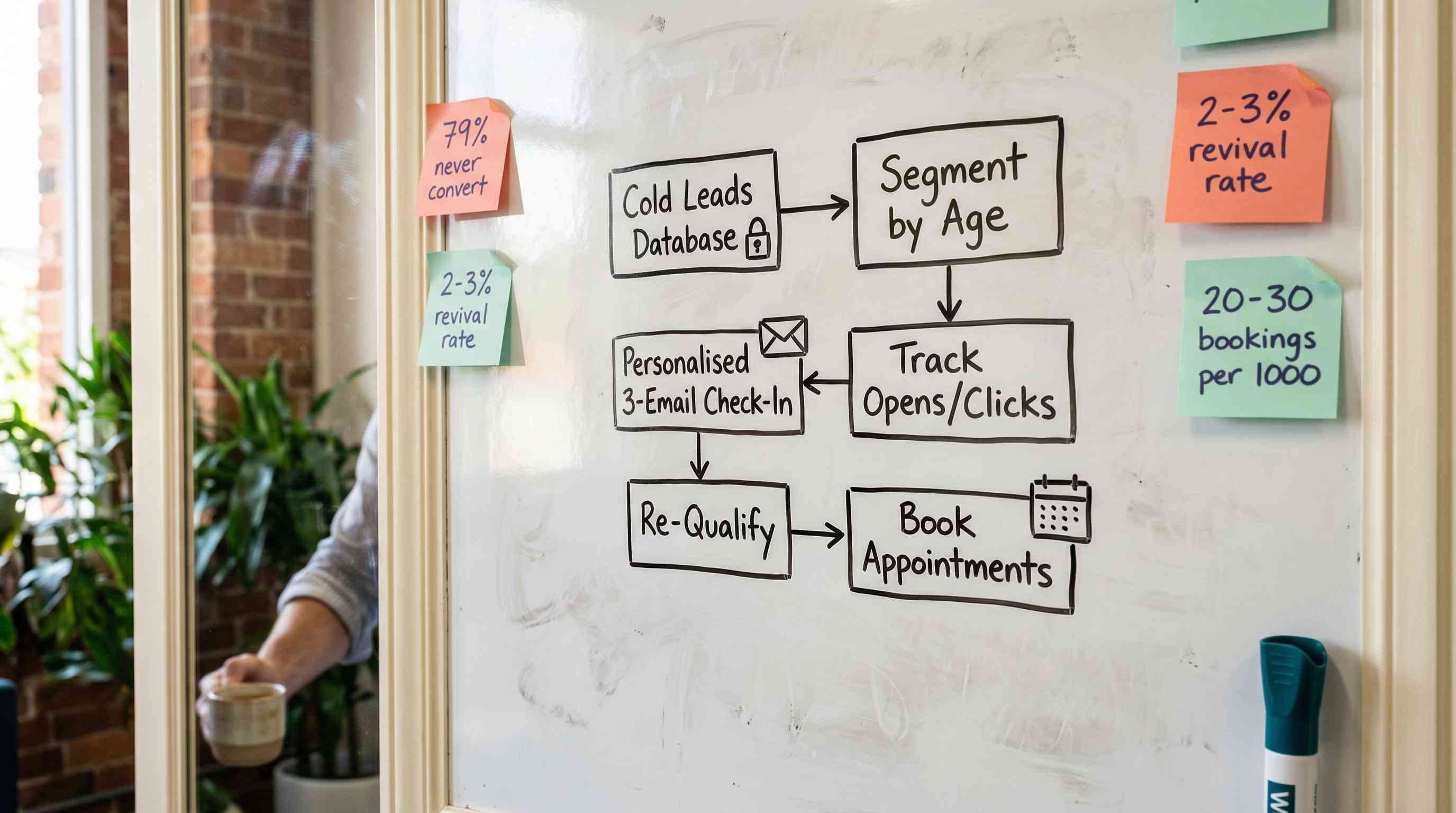
1. The ‘Check-In’ Workflow (3-6 Months)
Best for: Personal injury enquiries, dental treatment quotes, family law consultations
How it works:
Make.com monitors your CRM and identifies leads that:
- Enquired 90-180 days ago
- Had meaningful interaction (call, consultation, quote)
- Haven't been contacted in 60 days
- Haven't unsubscribed
The sequence:
Email 1 (Day 0): "Hi [Name], we spoke a few months ago about [specific service]. Has your situation progressed? If you're still considering [service], I'd be happy to update your quote or answer questions."
Email 2 (Day 7): Value-driven content. "I thought you might find this helpful: [relevant blog post or case study]."
Email 3 (Day 14): Soft close. "I'll assume you've sorted things out. If that changes, you know where to find us. I'll take you off this sequence."
Results: 8-12% response rate on Email 1, with 2-3% converting to bookings. For 1,000 leads, that's 20-30 new clients you'd previously written off.
Time to build: 2-3 hours
2. The ‘Educational Drip’ (6-18 Months)
Best for: Leads who downloaded guides or made general enquiries
How it works:
A 4-week educational sequence that rebuilds credibility:
Week 1: "You downloaded our guide on [topic] last year. Here's what's changed since then."
Week 2: Case study or testimonial showing how you helped similar clients.
Week 3: Myth-busting content addressing common misconceptions.
Week 4: Soft offer. "If you're still dealing with [problem], we're offering a free consultation."
Key features:
- Content pulled from existing blog/resource library
- Behaviour-based branching based on click patterns
- Automatic CRM tagging based on engagement
- Gradual escalation from educational to commercial
Results: 1-2% immediate conversion, but higher long-term value as engaged leads enter warm nurture streams.
Time to build: 4-5 hours
3. The ‘Re-Qualification’ Workflow (18+ Months)
Best for: Large databases where you're unsure which old leads remain relevant
How it works:
Start with a single, low-commitment touchpoint:
SMS or Email: "Hi [Name], it's been a while since we spoke about [service]. Quick question: is [problem] still something you're dealing with? Reply YES for updated information, or NO if you’ve managed to solve this issue."
Make.com then:
- Captures YES/NO responses
- Tags leads accordingly in your CRM
- Routes "YES" responses into nurture workflows
- Removes "NO" responses from reactivation (but keeps them in general newsletters)
For non-responders after 7 days:
"No worries if you missed my message. Just wanted to make sure you're not struggling with [problem]. We've helped many people in [city] with exactly this."
Results: 15-25% response rate on initial message. Of those who respond "YES," 30-40% engage with subsequent nurture. This workflow is about keeping the database clean as much as it is about driving conversions.
Time to build: 1-2 hours
4. The ‘Event-Triggered’ Reactivation
Best for: Time-sensitive services (tax-related legal issues, seasonal dental treatments, EOFY planning)
How it works:
Make.com monitors calendar dates and automatically reactivates relevant leads.
For law firms:
- Tax time (June/July): Tax disputes, estate planning, business structuring
- School holidays: Family law/custody arrangements
- EOFY: Business and commercial law
For healthcare:
- January: Cosmetic dentistry, weight loss (New Year's resolutions)
- January/February: Kids' orthodontics (back to school)
- October/November: Cosmetic treatments (pre-summer)
The sequence (triggered 4-6 weeks before the event):
Email 1: "With [event] coming up, many people are thinking about [problem]. We spoke last year about [service]. Is this something you're reconsidering?"
Email 2 (7 days later): "We're booking [event]-related appointments now. If you want to get sorted before [date], we should chat soon."
Results: Higher conversion than generic reactivation (3-5%) because timing is naturally relevant.
Time to build: 2-3 hours per event trigger
5. The ‘Competitor Monitoring’ Workflow
Best for: Competitive markets (metro law firms, CBD dental practices)
How it works:
Make.com monitors public data sources (Google Alerts, social mentions, review sites) for signals that cold leads are actively shopping again.
Example: A lead who enquired 8 months ago posts on Facebook asking for lawyer recommendations. Make.com catches this and alerts your team.
Key features:
- Requires API access to monitoring tools
- Focus on high-value leads only
- Creates real-time opportunities for manual outreach
Privacy note: Monitor public data only. Instead of "I saw your Facebook post," say "I noticed you might be reconsidering legal representation."
Results: Low volume but high conversion when you catch someone actively shopping.
Time to build: 6-8 hours (complex integrations)
6. The ‘Referral Incentive’ Workflow
Best for: Leads who didn't convert but had positive interactions
How it works:
Make.com identifies leads who:
- Had consultations but didn't proceed
- Gave positive feedback
- Didn't convert due to factors outside of your control
One-time message:
"Hi [Name], I know you decided not to proceed with [service]. But if you know anyone dealing with [problem], we'd appreciate the referral. As a thank-you, we offer [appropriate incentive]."
Note: Lawyers generally can’t pay for referrals in Australia, but modest, non-monetary expressions of thanks are usually permitted, although rules vary across states.
Results: Low direct conversion but high goodwill. Even a 1-2% referral rate from 1,000 leads equals 10-20 new enquiries.
Time to build: 1 hour
What Should We Avoid Doing?
Sending the same message to everyone: Your 3-month-old PI lead and 2-year-old family law lead need different approaches.
Being too salesy: Lead with value, not discounts.
Not tracking engagement: Make.com shows who opened and clicked. High engagement signals manual follow-up opportunities.
No clear next step: Every email needs one CTA, not three.
Which Workflow to Build First?
Start with Workflow #1 (Check-In) if you have steady enquiries but inconsistent conversion. Highest immediate ROI.
Start with Workflow #3 (Re-Qualification) if you have 5,000+ contacts and haven't contacted most in years. Clean up your database first.
Start with Workflow #4 (Event-Triggered) if your services have clear seasonal demand and you want ‘set and forget’ automation.
Most practices should build Workflows #1 and #3 first, get quick wins from recent leads while cleaning up your database.
The Bottom Line
You’ve already spent the money to acquire these leads. What matters now is whether you get value from that investment or let it quietly sit in your CRM.
The practices and firms that win aren't the ones with the biggest ad budgets. They're the ones with the most sophisticated follow-up systems.
Make.com gives you the infrastructure to compete without hiring SDRs or spending $50,000 on enterprise platforms.
It’s time to stop thinking of your database as a museum filled with artifacts, but as a trove where leads can be reawakened. After all, the workflows generated through Make.com are proven to work statistically, and the ROI is measurable.
Need help implementing these workflows? Leadtree specialises in marketing automation and lead nurturing systems for Australian law firms, dental practices, allied health providers and other professional services. We build Make.com workflows that recover lost revenue from your existing database.
Book a free 30-minute call: https://www.leadtree.agency/product/book-call.