
You're spending thousands of dollars on Google Ads every month and getting lots of clicks and leads, but something feels off when you look at your conversion tracking.
Either the numbers don't match what's actually happening, you're not tracking the right things, or, most commonly, you haven’t fully “set up” conversion tracking, leaving it incomplete, inaccurate or even missing critical data.
The sobering reality here is that traditional tracking now misses 30-40% of conversions because of ad blockers, privacy settings and cookie restrictions. This means that if you're relying solely on the basic Google Ads tag, you're actually optimising on incomplete data.
This handy guide will walk you through how to set up Google Ads conversion tracking properly in 2026, including vital aspects like enhanced conversions, server-side tracking, call tracking and offline conversion import.
This is what actually works, not just what's technically "set up."
The Problem Most Firms Have
When we audit new client accounts, we consistently see:
1. Only tracking form submissions, ignoring phone calls
Most service businesses get roughly half of their leads via phone. If you're not tracking calls, Google's algorithm will only optimise for form submissions, making it likely that you end up getting worse overall results.
2. Not using enhanced conversions
Enhanced conversions significantly improve attribution accuracy by sending hashed first-party data (email, phone, etc.) to Google. You will end up losing around 40% of conversion visibility due to browser restrictions without it.
3. No offline conversion import
If you track form submissions as conversions but the person who filled it out never shows up for the consultation, or comes in but doesn't sign, Google thinks they converted and optimises toward more leads like that regardless of quality.
4. No server-side tracking
Ad blockers, Intelligent Tracking Prevention (ITP), and third-party cookie restrictions prevent around 30% of conversions from being tracked via browser-based tags alone.
5. Relying solely on GA4 without proper Google Ads integration
GA4 tells you what happened, but the algorithm can't use it to optimise if that data isn't flowing back to Google Ads.
This results in Google optimising based on incomplete and inaccurate data, and you being more likely to overpay for conversions while missing better-quality leads.
The Stack That Works
For clients spending more than $2,000-3,000 per month on Google Ads, we implement:
1. Google Tag Manager (GTM) for Tag Management
Instead of adding conversion tags directly to your website, we use GTM to manage all tags, making testing, debugging and updates much easier.
GTM provides a cleaner implementation, easier troubleshooting and better control over where data is sent.
2. Enhanced Conversions
Enhanced Conversions sends hashed first-party customer data to Google. This improves attribution, which is particularly important as browser privacy restrictions make traditional tracking less reliable.
Setup: enable Enhanced Conversions for your conversion actions in Google Ads and then configure GTM to capture and hash customer data at the point of conversion.
This improves match rates by around 20-30%, meaning Google can tie more conversions back to ad clicks even when browser tracking fails.
Common mistake: failing to hash the data properly or not capturing it at all. Email and phone fields must be captured from forms, normalised (lowercase, trimmed) and hashed with SHA256 before sending.
3. Server-Side Tracking
Instead of sending data directly from the user's browser, server-side tracking sends it from your own server. This bypasses ad blockers and browser privacy restrictions.
We use Stape.io for the implementation of server-side tracking, which hosts the Google Tag Manager server container and takes care of the infrastructure.
Why this matters: browser-based tags are blocked by around 30% of users, and server-side tracking captures conversions that browser-based tracking misses. This gives Google's algorithm better data on which to optimise.
Cost: approximately $8-$17 USD per month for Stape.io, plus the time it takes to implement. For firms spending over $5,000 on ads each month, this is essential. Even for smaller budgets, enhanced conversions alone provide most of the benefit.
Client reaction: "Isn't that just extra cost for marginal gains?"
No. We've seen server-side tracking recover as much as 25% of previously invisible conversions. That's not marginal, it's the difference between thinking a campaign has a 3% conversion rate and realising it's actually 3.5-3.8%.
4. Call Tracking
When it comes to service businesses, phone calls are often higher-intent than form submissions. Dynamic number insertion (DNI) tracks which ads drive phone calls and sends that data back to Google Ads.
We use:
- CallRail for most clients (solid features, good integrations)
- Delacon for Australian-focused businesses that prefer local providers
- GoHighLevel for clients already using it as their CRM (native call tracking included)
Setup: install a call tracking script on your website. This will dynamically replace your phone number with a tracking number based on where the visitor comes from. Whenever someone calls, the platform logs which ad/keyword drove the call and reports it back to Google Ads as a conversion.
Cost: $30-300 AUD per month, depending on call volume.
Critical step most people miss: configuring the call tracking platform to send conversion data back to Google Ads. It's not automatic, so you need to integrate it yourself. This is generally done via webhook or native integration.
5. GA4 for Analytics (With Proper Google Ads Linking)
GA4 tracks user behaviour, conversions and attribution, but only works properly if it’s linked to Google Ads.
Setup: in GA4, create custom events via GTM (create trigger → GA4 event tag with parameters) or GA4 interface (Admin → Events → Create Event). Then register all custom parameters as Custom Definitions in Admin → Custom Definitions, and link GA4 to Google Ads to import conversions.
This will ensure conversion data flows bidirectionally and that GA4 sees the full user journey so Google Ads gets conversion data to optimise campaigns.
Common mistake: GA4 is set up but not linked to Google Ads, causing the data to sit in GA4 without feeding back to campaign optimisation.
6. Offline Conversion Import via CRM
If someone submits a form and Google tracks it as a conversion, what happens next?
- Did they book a consultation?
- Did they show up?
- Did they become a client?
If you don't feed this data back to Google, the algorithm will optimises for "any form submission" instead of for "form submissions that actually convert to clients."
How it works: your CRM (HubSpot, GoHighLevel, Salesforce) tracks what happens after the initial enquiry has been made. You set up automation to push "qualified lead" or "client signed" events back to Google Ads, tied to the original click ID (GCLID).
This is called offline conversion import or CRM conversion import, and it's how you tell Google that the leads you got were good and you’d like to optimise for more like them.
We've worked with law firms that tripled in size over the course of three years, largely because proper conversion tracking allowed Google's algorithm to optimise for actual revenue-generating clients instead of just leads.
Implementation: the majority of CRMs can do this via native integration (HubSpot has direct Google Ads integration) or via Zapier/Make.com automation, which sends conversion events back using the Google Ads API.
The caveat: this will only work if your CRM data is good. If your team fails to update lead statuses, mark consultations as "attended" vs "no-show," or log whether clients signed, the data fed back to Google is worthless.
Getting team buy-in and proper CRM hygiene is as important as the technical setup.
Step-by-Step Implementation
Here's the order in which you should tackle this:
Phase 1: Foundation (Week 1-2)
- Set up Google Tag Manager if you're not using it already. Migrate existing tags into GTM.
- Configure baseline conversion tracking: form submissions, phone calls, key page views (e.g., "thank you" page after booking consultation).
- Set up GA4 properly and link it to Google Ads.
- Test everything: use GTM Preview mode and Google Tag Assistant to verify your conversions are working correctly.
Phase 2: Enhanced Tracking (Week 3-4)
- Implement Enhanced Conversions: enable in Google Ads, configure GTM to capture and hash customer data.
- Set up call tracking: install CallRail/Delacon/GoHighLevel, configure dynamic number insertion and connect to Google Ads.
- Test again: make test conversions and verify they appear in Google Ads with proper attribution.
Phase 3: Advanced (Week 5-6. This is optional but recommended for larger budgets)
- Implement server-side tracking: set up GTM server container via Stape.io, migrate tags to server-side and test thoroughly.
- Configure offline conversion import: connect cRM to Google Ads, set up automation to push qualified leads and client conversion events.
- Validate: review conversion data in Google Ads, ensure match rates are good (70-80%+ for Enhanced Conversions) and confirm offline conversions are being imported properly.
What Good Tracking Looks Like
Once properly set up, here's what you should see in Google Ads:
Multiple conversion actions being tracked, including:
- Form submissions
- Phone calls
- Consultation bookings
- Qualified leads (from CRM)
- Clients signed (from CRM)
Enhanced conversion match rates of 70-90%
This metric shows you the amount of conversions Google successfully matched to ad clicks using enhanced conversion data. Rates below 50% indicate issues with setup.
Conversion data that matches reality
Your Google Ads dashboard should roughly align with what's actually happening. If you manage to get 50 leads that turn into 15, your tracking should reflect that.
Ability to optimise toward real outcomes
You can tell Google, "Don't just optimise for leads, optimise for qualified leads", or "Optimise for clients signed, not just consultations booked." This will focus the algorithm on what is really driving revenue.
Common Mistakes and Gotchas
1. Enhanced Conversions Without Proper Data Capture
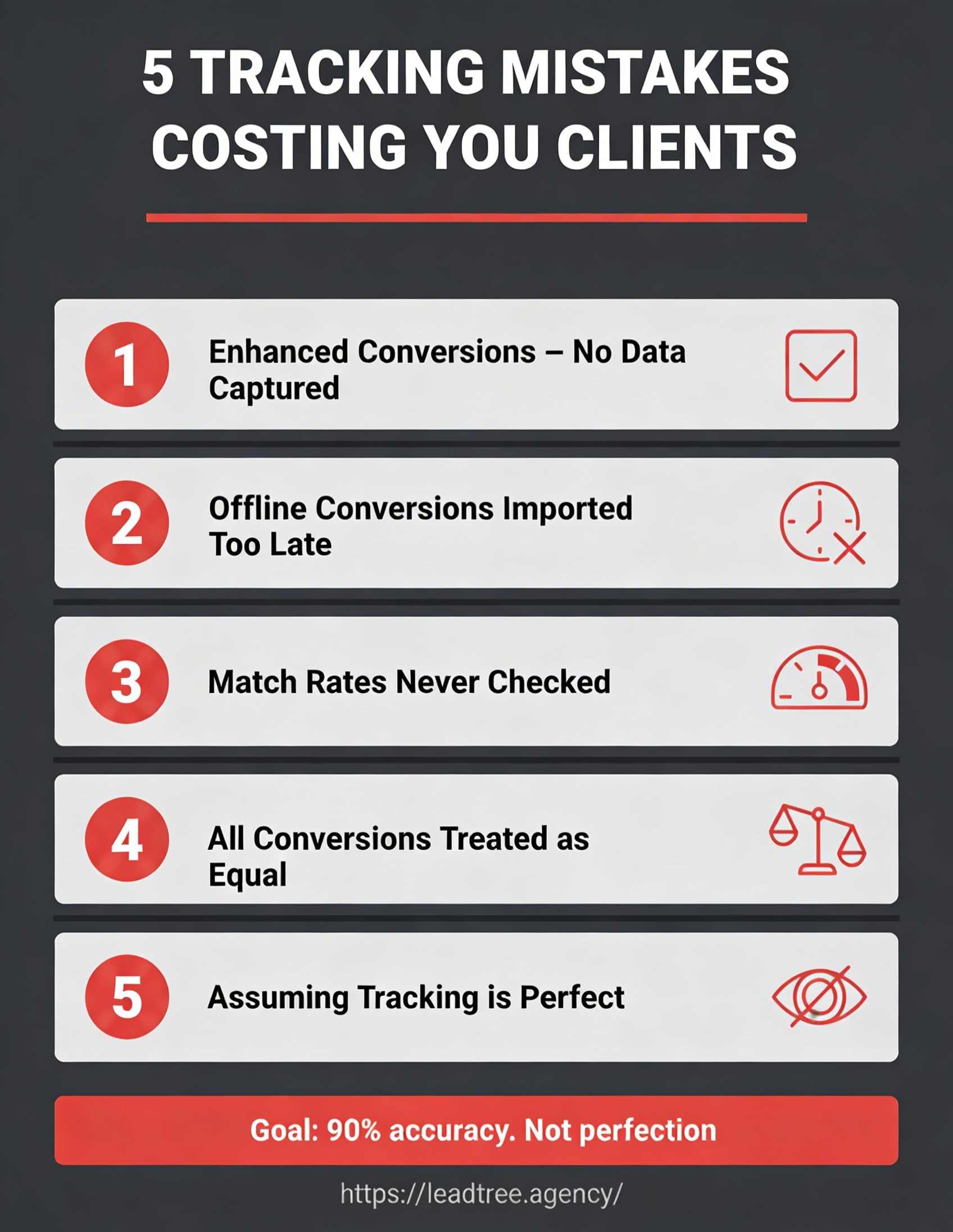
A lot of firms enable Enhanced Conversions but fail to actually capture email/phone data at the point of conversion. GTM needs to pull this from form fields, hash it and send it, and if these fields aren't being captured, Enhanced Conversions won’t do anything.
2. Importing Offline Conversions Too Late
Google has a conversion window of around 30-90 days. If you import an offline conversion (e.g., "client signed") months after the original click, Google may fail to attribute it. Try to import conversions within this window (ideally within days or weeks).
3. Not Validating Match Rates
After setting up Enhanced Conversions, check your match rates in Google Ads. If these are low, it indicates problems with data quality (emails malformed, phone numbers formatted incorrectly, hashing issues, etc.).
4. Tracking Everything as Equal Value
Not all conversions are made equal. For example, a phone call might be worth more than a form submission and a qualified lead is worth more than an unqualified one. Use conversion values or value-based bidding to reflect this.
5. Assuming Perfect Tracking Is Possible
Even if you set everything up correctly, you still won't capture 100% of conversions. Because of ad blockers, VPNs, privacy-conscious users and cross-device behaviour, a little attribution will always be incomplete.
The goal here isn't perfection, it's to get around 90% accuracy. This is a lot better than the 50-60% accuracy you would get without enhanced and server-side tracking.
Focus on trends, not exact numbers. If conversions are trending up month-over-month and cost per conversion is improving, tracking is working. This is true even if the absolute numbers aren't precise.
The ROI of Proper Tracking
Is all this effort worth it?
For service businesses spending $3,000+/month on Google Ads, it absolutely is.
We've seen:
- 15-25% more conversions captured via server-side tracking (previously invisible)
- 20-30% better attribution thanks to Enhanced Conversions
- 30-50% better campaign performance when optimising toward qualified leads vs all leads
- Firms that implemented proper tracking doubling or tripling their revenue over 2-3 years because Google was finally able to optimise toward what actually works
Without proper tracking, you're flying blind and might be spending money on campaigns that don't actually convert to clients while underinvesting in campaigns that do.
With proper tracking, Google's algorithm becomes your ally, learning what works, optimising toward real outcomes and improving over time.
The setup takes time and effort, but for any firm serious about Google Ads, it's a non-negotiable.
Need conversion tracking that actually captures all your leads? Leadtree specialises in Google Ads conversion tracking and campaign optimisation for Australian service businesses.
We don't just set up tags; we implement enhanced conversions, server-side tracking, call tracking and CRM integration that captures 80-90% of conversions.
Book a 30-minute free call to discuss how we can help today: https://www.leadtree.agency/product/book-call