
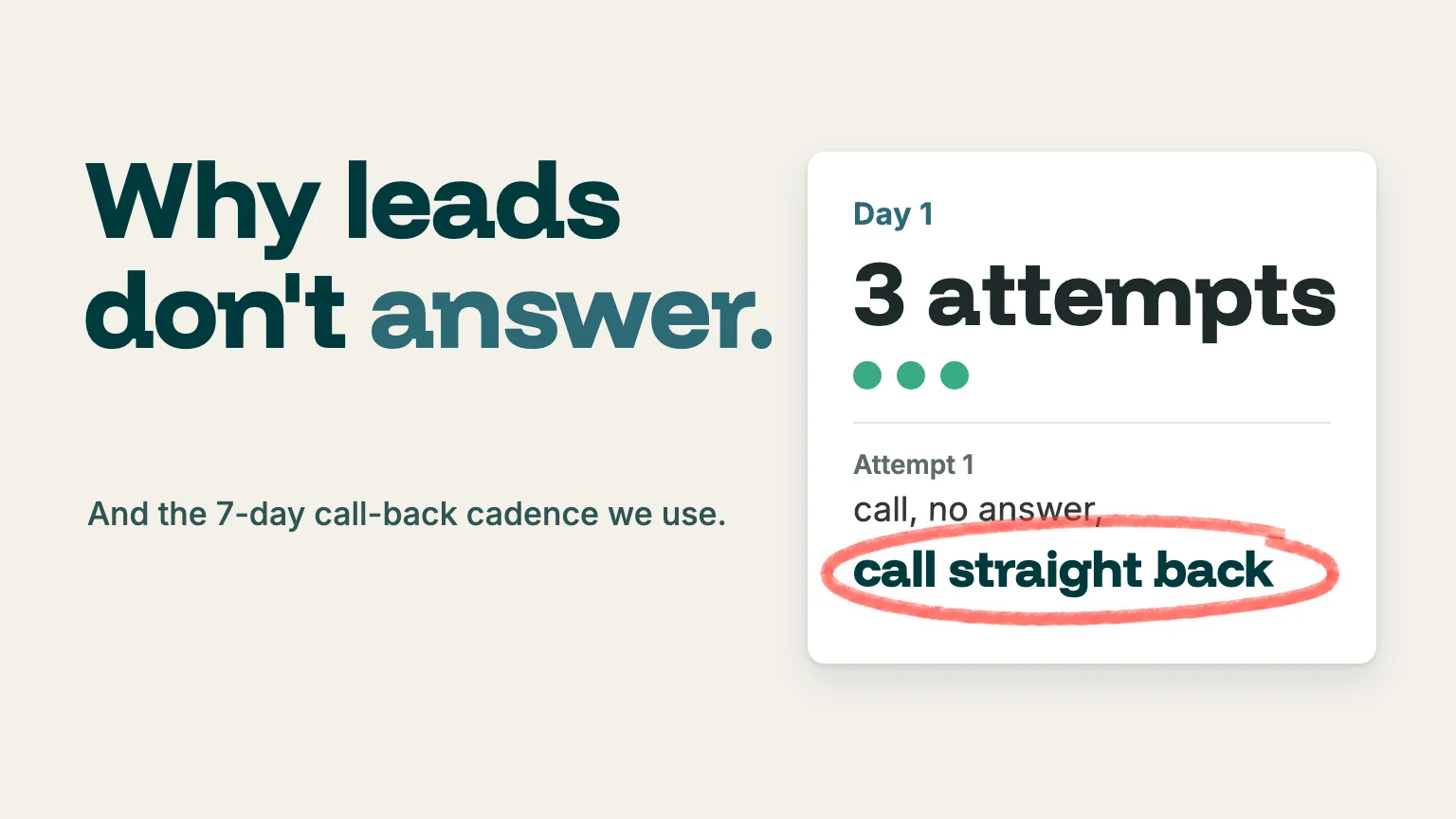
When did you last pick up a call from a number you didn't recognise?
When recording one of our recent social videos, Jenny, our account manager, put it plainly: "Unknown number. Oh, I never answer that." Jenny is not doing anything out of the ordinary. But she is exactly the person your intake team is trying to call back.
The problem isn’t that your leads have lost interest. They only filled in your form an hour ago. It’s that your call arrives looking like every scam and sales call they've learned to ignore.
At Leadtree, we spend a lot of our time on what happens after the lead comes in, and in our experience, reaching people is becoming harder.
Here, we discuss what has changed on people's phones, what to say when an AI screener answers for them, and the call-back cadence we give clients, attempt by attempt.
Why are leads harder to reach by phone in 2026?
Short answer: three things stack up.
1: People don't trust unknown numbers
2: Most phones live on silent
3: Both iPhones and Pixel phones can now have an AI answer unknown callers first.
Our own team is no different. I said as much on our podcast: "I get pretty dubious because I do seem to get quite a lot of these scam calls." Then there's the ringer: "now almost everyone has their phone on silent."
The new layer is call screening. Here is what each platform actually does, according to Apple's and Google's own help pages:
Apple's unknown callers page for Australia lists the same three settings. Google's help page lists automatic screening on Pixel phones in Australia, Canada, Ireland, the UK, and the US.
These features are genuinely good for consumers. But at Leadtree, we also view them as a real new hurdle for any service business that relies on calling enquiries back.
What do you say when an AI screener answers?
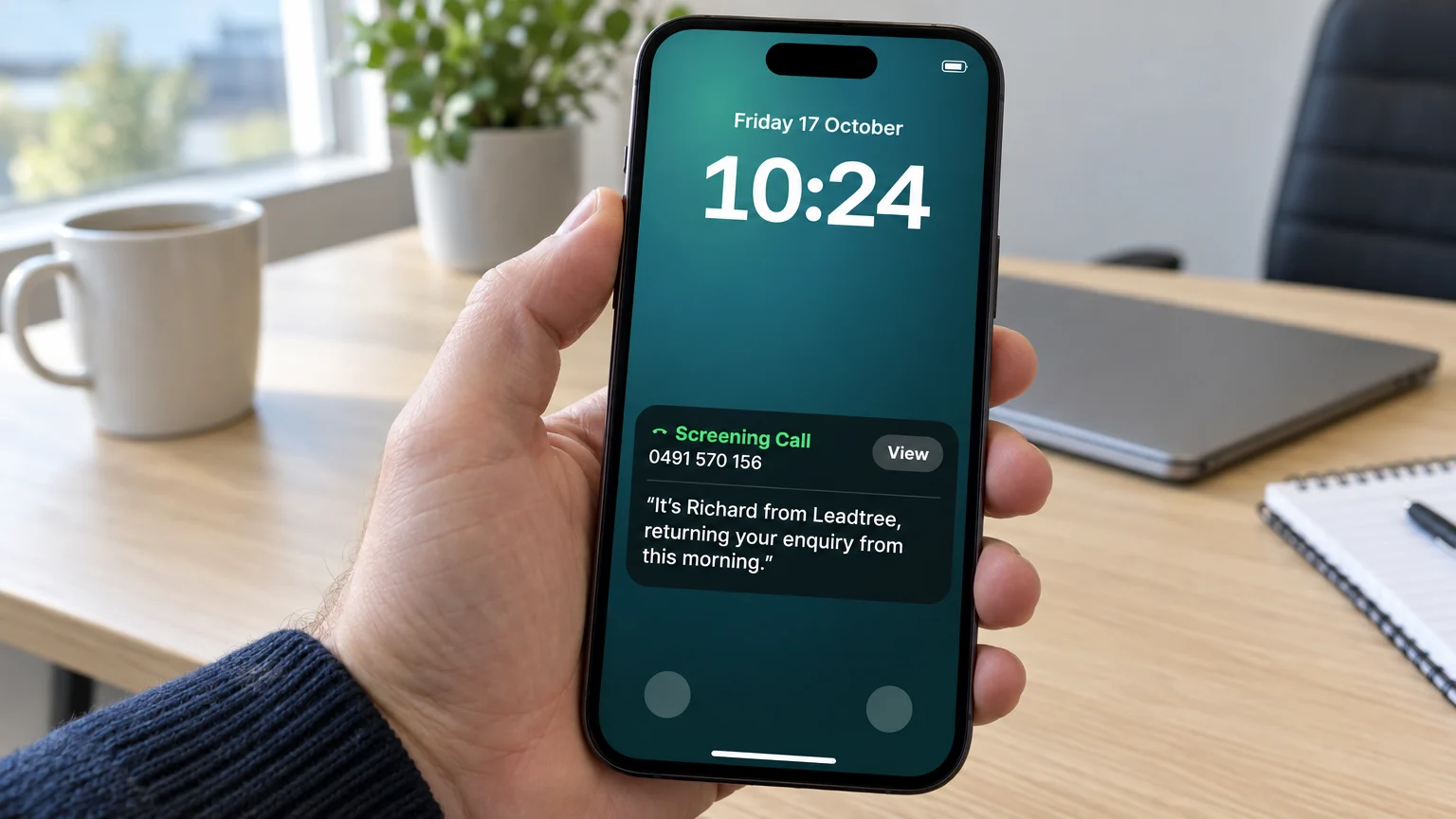
Short answer: your name, your business, their enquiry, and why you're calling, in one sentence. The lead is reading it on their screen while they decide whether to answer.
I found this out first-hand. I've hit what I called "the Apple AI gatekeeper" in October while calling back enquiries that came into Leadtree.
It changes the job because you're no longer talking to someone who has already answered. You're writing a one-line pitch, out loud, for a person glancing at a lock screen.
Afterwards, I described it like this: "you've got to say something compelling," and you've got to say it fast.
Our suggested scripts (swap in your own details):
- "It's Sarah from [business], returning your enquiry about [service] from this morning."
- "It's Tom at [business]. You asked us about [service] yesterday, and I've got your answer."
- "It's Priya from [business], calling back about the quote you requested on our website; it should just take 2 minutes."
What makes these work:
- Name and business first. That's what the screener asks for.
- Their action, not your offer. "Your enquiry" tells them they started this.
- A specific reason. "The quote you requested" beats "a quick chat".
- No pitch and no questions. "Is now a good time?" reads badly as text.
One more step we recommend: put the number you'll call from in the confirmation email, and ask people to save it. On an iPhone, a saved number skips screening entirely.
Tip 1: On the first attempt, call straight back
Short answer: if your first call goes unanswered, hang up and redial straight away. Count both calls as attempt one.
We give this tip to all our clients. On the podcast I put it simply: "If they don't answer, just literally call them straight back." In one of my walking videos, it was shorter still: "First time you call, maybe just call back twice."
Why it works: "I think that sometimes people go, ‘oh, yeah, maybe it is important, or maybe a robot wouldn't do that.’" A second ring straight after the first looks like a person trying to reach them, not an auto-dialler working down a list.
Use it once, on the first attempt only, not every time you call. Two back-to-back calls on every attempt can start to feel like pressure.
Tip 2: Text a minute or two before you call
Short answer: a short heads-up SMS just before the call tells the lead the next unknown number is you.
Jenny's own exception to "never answer" was exactly this: "Unless they have sent me, like, a message before telling me we're about to call you about this."
Two of our clients do this now.
One client recently started doing it by hand, sending the text a minute or two before dialling. Their team believe it has roughly doubled the number of people who pick up.
That's their estimate from a short manual test, not something we've measured. I'd expected more of an incremental improement, and I'm not sure everyone would see such a big jump.
A finance firm we work with has automated it. Their contact-centre platform, MaxContact, knows which lead is next in the call list and sends the text itself shortly before the call. It's connected to their CRM through MaxContact's HubSpot integration.
A note on fit. In our view, MaxContact suits larger operators. When we recently spoke to MaxContact, they told us their customers typically run 10 or more users and that they don't recommend it as your main internal phone system.
Our read of that: 10 or more people on the new-enquiry side taking those first calls, not a firm of 10 staff.
For a smaller team, a manual text is fine at low volume. Once you're making calls in any real volume, automate it.
A CRM that handles both texts and calls, such as GoHighLevel, keeps the heads-up and the call in one conversation inbox. Send the text from the number you'll call from.
Our suggested heads-up text: "Hi Sam, it's Priya from [business]. I'll call you in 2 mins from this number about your enquiry. Reply STOP to opt out."
The 7-day call-back cadence we recommend
Short answer: front-load it. Three attempts on day one, two on each of days two and three, then one per business day until about day seven. Then a friendly wrap-up, and hand the lead to nurture. As our main client says, “leads are like prawns in the sun.” If you don't get them quickly, they're going to go rotten!
In our July piece on what happens after the lead comes in, we sketched the outline. This is the attempt-by-attempt version we give clients for a lead that arrives overnight:
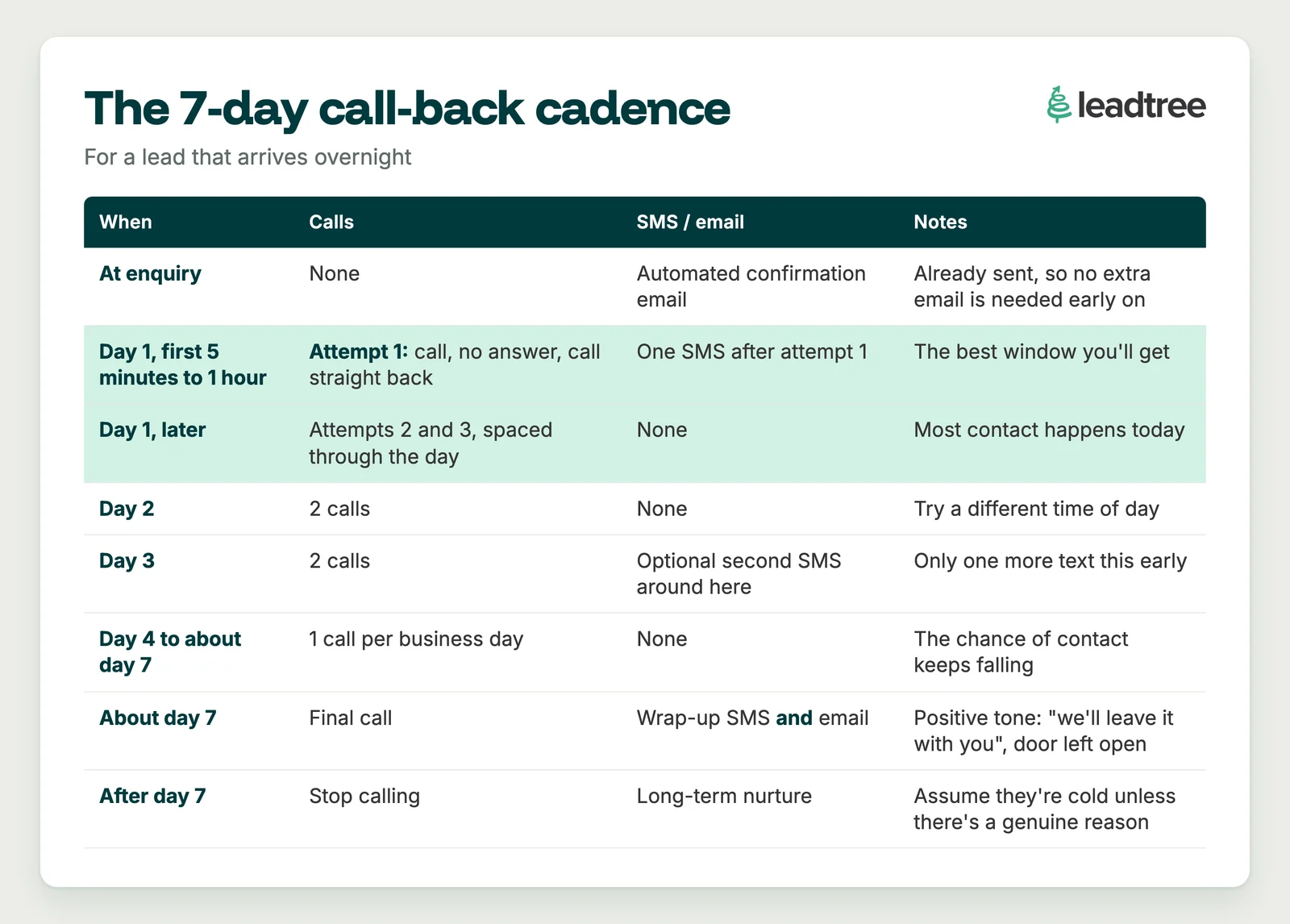
Use common sense on timing. A lead that lands at 4pm can't get three attempts that day, so shift the plan rather than cramming calls in.
The first window matters most. In our experience, reaching someone in the first 5 to 10 minutes, or at least within the hour, is the best chance you'll get. Day one is where most of the action happens, and it dwindles from there.
By about day seven, with that much follow-up behind you, the lead is cold. Unless something genuine got in the way, such as they went away just after enquiring, our view is that you treat the silence as an answer. Let your lead nurturing timeline take over from there.
Go easy on the texts (and stay inside the Spam Act)
The rule of thumb I give our clients is light: one SMS after the first attempt, maybe one more a couple of days in, and one in the final wrap-up. That's it. If you also send a heads-up text before the first call, it sits alongside that day-one text rather than replacing it.
Do you need an instant "we got your enquiry" text?
It depends on how fast you call back. If your team usually calls within a minute or two during business hours, which is common with a MaxContact-style setup, I'd skip the instant acknowledgement text. A thank-you text, then a heads-up text, then a call, all inside two minutes, is too many in a row.
After hours is different. That's where an instant text earns its place, because it sets expectations: "Thanks for your enquiry. We'll call you tomorrow morning after 8:30am." (Or Monday after 8:30am, if it lands on a Friday night.) Tailor it to when the lead comes in and when you'll actually call.
There's a legal reason to stay light, too. The Spam Act 2003 (Cth) covers commercial SMS. The ACMA's guidance says you need consent, must identify your business as the sender, and need a working unsubscribe that is actioned within five working days.
Someone who has just filled in your form has knowingly given you their number, which can support inferred consent. The ACMA is direct about the limits, though: "Inferred consent is not as reliable as getting someone's express consent."
Our read (we're marketers, not your lawyer):
- Add a clear consent line to your enquiry form.
- Name the business in every text.
- Include "Reply STOP", and send from a real number. The ACMA notes that alphanumeric sender names generally can't receive replies.
- Stop texting people who have gone quiet after the wrap-up.
Our take
Leads haven't stopped wanting help. They've stopped trusting unknown numbers, and their phones now screen calls for them.
Our fix is mostly about being recognisable: a heads-up text, a second ring on the first attempt, one clear sentence for the screener, and a cadence that front-loads day one and knows when to stop. If you change one thing this week, we'd start with the heads-up text and measure what it does.
Do you even need the phone call?
I noticed this one in my own habits first. The last thing we often want to use our phone for is actually using it as a phone. Which raises the question: "Do you actually need to get those people on the phone at all?"
My answer is yes, keep the phone call. For service businesses, phone calls work very well when you can get someone on the line, and plenty of people genuinely want one. I wouldn't recommend any firm removing that option.
What I'd add is a second route for people who actively don't want to call:
- Messaging back and forth. SMS or WhatsApp, where people can send photos and details at their own pace.
- Easy forms with document upload. When I took out a mortgage, I still had a couple of video calls, but a lot of it moved forward through simple forms where I could upload documents, plus some back and forth by SMS.
- Messaging to qualify before the call. Keep the website form short, then use messaging to verify the lead, get a bit more detail and give them something useful. They feel engaged, and you find out which leads are worth the call.
Some of this reduces the number of calls. Most of it is about being open to people who'd rather type. It's an option alongside the phone, not a replacement for it.
What should you measure?
You can't tune a cadence you don't measure. Log every attempt in your CRM with an outcome (HubSpot's call outcome field is enough), then track three numbers:
Our view: these three numbers tell you more than any total. Run them for a month, change one thing, then run them again.
If you'd like a second pair of eyes on how your enquiries are followed up, from the first ring to the wrap-up text, that's work we do every week.
We'll look at your response times, your cadence and your contact rates, and show you where leads are slipping away before anyone speaks to them.
Book a time here: https://www.leadtree.agency/product/book-call