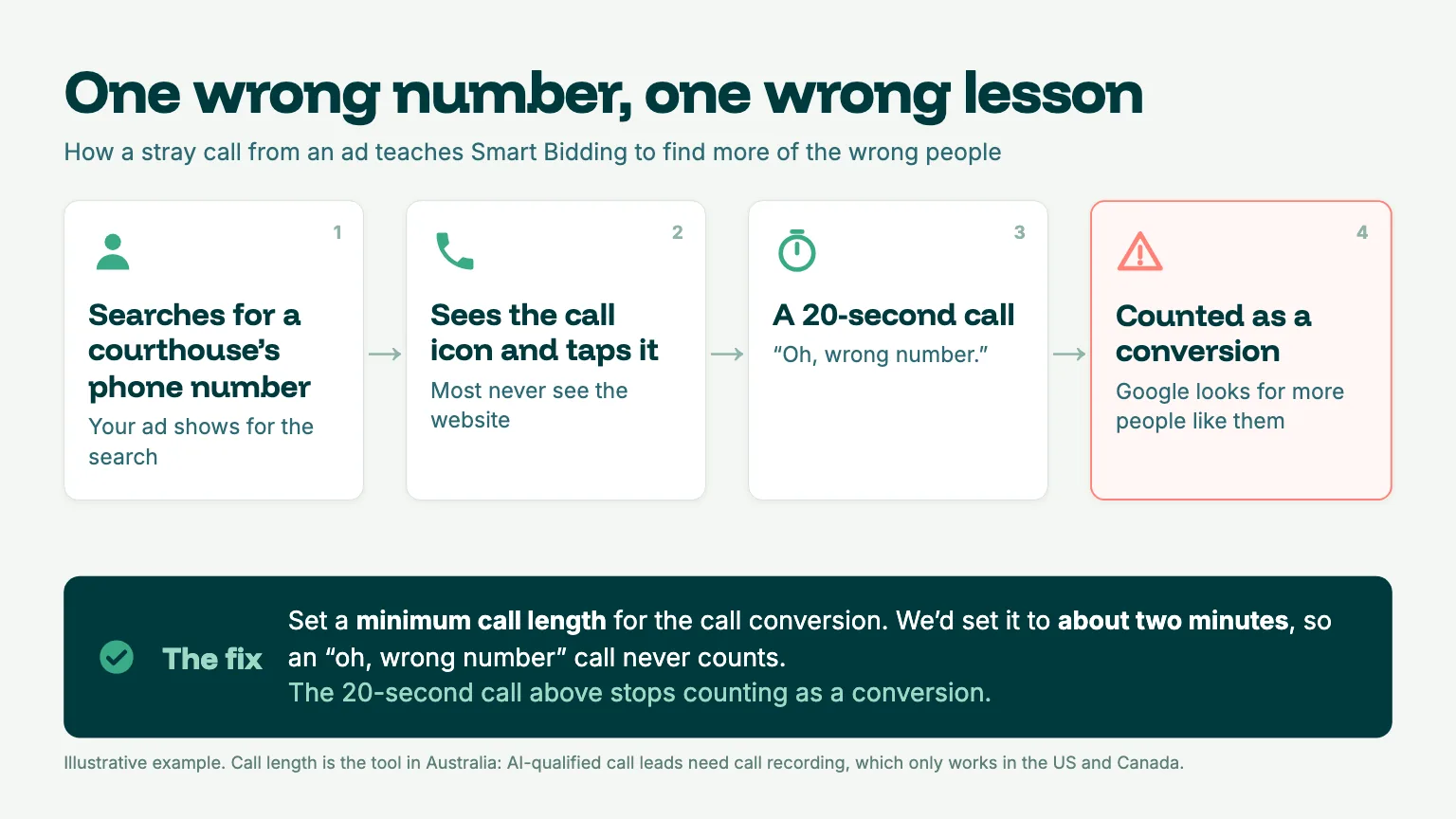
We recently reviewed a Google Ads account where some of the phone calls being recorded as conversions weren't even from potential clients. They were from people trying to contact a local courthouse.
Those people had searched for the courthouse's phone number, spotted the call button on the ad and clicked it. Google counted those calls as conversions, despite none being genuine enquiries for the firm.
The problem? Every one of those calls was teaching Google to optimise for the wrong outcome.
Google's Smart Bidding works towards the conversions you tell it matter. However, if those conversions don't reflect genuine business opportunities, you're effectively asking Google to find more of the wrong people.
It's something we come across when auditing Google Ads accounts. Some firms aren't tracking what happens beyond the initial enquiry, while others don't have the systems in place to send that information back to Google at all.
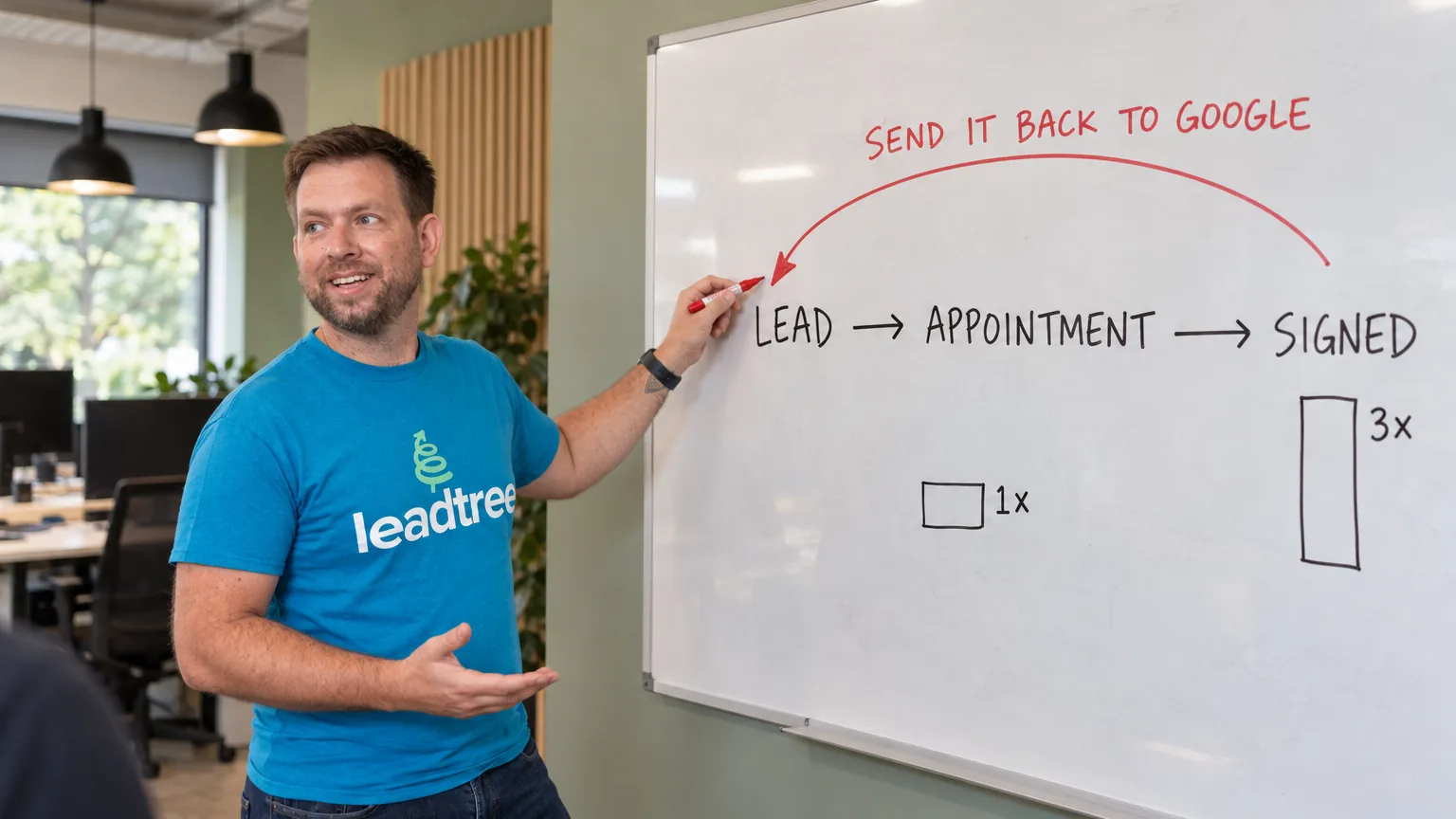
That means Google knows when someone makes an enquiry, but has no idea whether that person was a qualified lead, booked a consultation or eventually became a paying client.
We've previously covered why your CRM needs to talk to Google Ads and why AI Max makes that urgent.
Now, we're getting into the practical side: How we approach this at Leadtree, the steps involved in feeding better conversion data back to Google, and the checks we use to make sure its bidding algorithms are learning from the right outcomes.
Key takeaway: Feed Google conversion data from a stage that's close enough to becoming a client to reflect genuine business value, but happens frequently enough for Smart Bidding to learn from.
Then, assign values based on your firm's actual conversion rates and make sure irrelevant enquiries aren't influencing your campaigns.
Our approach: Get the data right first, build enough volume second, and refine conversion values third. More conversion data isn't necessarily better if you're measuring the wrong things.
What you'll need before getting started
Before diving into the technical side, there are a few things you'll need to have in place:
- Access to Google Ads, Google Tag Manager and your CRM, or whichever platform your firm uses to manage enquiries and leads.
- At least 90 days of lead data that allows you to follow the journey from the initial enquiry through to becoming a signed client.
- Someone responsible for managing your CRM, who can make sure lead information is accurate, updated and maintained consistently.
- An understanding of what a new client is worth to your firm. It doesn't need to be an exact figure to begin with, but you should have a reasonable estimate. Our cost-per-lead guide breaks down the numbers and how to calculate them.
Step 1: Get the foundations right with server-side tracking
Before Google can optimise towards better leads, it needs to understand which ad clicks are actually producing results. That starts with making sure the tracking is working properly.
Traditional browser-based tracking isn't always reliable. Ad blockers, browser privacy settings and tracking restrictions can prevent valuable information from reaching Google, leaving gaps in your reporting. Additionally, when Google is working with incomplete data, it's harder for its bidding algorithms to understand what's genuinely driving results.
This is where server-side tracking comes in.
Not long ago, setting up server-side tracking meant organising a Google Cloud project, involving a developer and committing to ongoing hosting costs. For many smaller firms, the time, cost and technical requirements made it difficult to justify.
Now, that's changed. There are now more accessible ways to improve tracking without needing to build and manage everything yourself.
Option A: Stape
At Leadtree, we use Stape for most of our clients.
Stape provides a managed hosting solution for server-side Google Tag Manager, making it easier to implement server-side tracking without the complexity of managing your own server infrastructure.
A big advantage is that it isn't limited to Google. Alongside Google Analytics 4 (GA4) and Google Ads, Stape supports integrations with platforms including Meta's Conversions API, TikTok and Snapchat.
This makes it particularly useful for firms running campaigns across multiple advertising platforms, or those planning to expand beyond Google Ads.
And we've seen the difference it can make.
For one of our major clients, Stape's September report showed 34.83% of GA4 page views restored through its tracking recovery features.
In practical terms, that's a substantial amount of additional measurement data that may otherwise have been missed because of ad blockers and browser tracking restrictions.
It's a good example of why tracking quality matters. If a significant portion of website activity isn't being captured, you're making advertising decisions without the full picture.
Of course, recovering more data doesn't automatically mean better leads. However, it does give you a more complete foundation for understanding campaign performance and improving optimisation.
Option B: Google tag gateway for advertisers
If your firm is primarily advertising through Google, there's another option worth considering.
Google tag gateway for advertisers is Google's simpler approach to improving how its tracking tags are delivered.
Rather than loading Google tags directly from Google's domains, the gateway allows them to be served through your website's own domain, with measurement data then forwarded to Google.
This can help reduce some of the tracking limitations associated with traditional third-party tag delivery.
It's also relatively straightforward to implement. Depending on your website setup, you can configure it through Google Tag Manager under Admin > Google tag gateway. Websites using Cloudflare may have an even simpler setup process.
For firms that only need to improve Google Ads and GA4 tracking, it's a practical place to start.
However, there's an important limitation: Google tag gateway is designed for Google's own tracking tools. It doesn't provide the same broader, multi-platform capabilities as a solution like Stape.
So, which option do we recommend?
It really comes down to where your firm is advertising and what you need your tracking setup to achieve.
For firms focused exclusively on Google Ads, Google tag gateway can be a sensible and relatively straightforward starting point.
However, if you're running campaigns across Google, Meta or other advertising platforms, we'd generally recommend Stape for its flexibility and broader integration capabilities.
At Leadtree, our priority isn't simply implementing the most advanced tracking setup available. It's making sure the solution suits the business, captures meaningful data and supports better advertising decisions.
The goal isn't just to track more activity. It's to give Google more reliable information about the activity that actually matters to your firm.
Step 2: Check your CRM data before connecting anything
This is one of the most important steps in the process, and one we approach with particular caution at Leadtree. When you start sending CRM data back to Google Ads, you're essentially telling Google which leads are valuable and which outcomes it should prioritise.
The catch? Google doesn't know whether the information you're providing is accurate. It uses the conversion data you send to inform its bidding decisions. If your CRM data is unreliable, you could end up training Google's algorithms to optimise towards the wrong outcomes.
When we audit a law firm's CRM, the issues we uncover often have very little to do with the technology itself. More commonly, they come down to how the CRM is being used day to day.
Leads might be sitting in the wrong status, team members might be using pipeline stages differently, or enquiries might remain open long after they've been won or lost.
While these might seem like minor administrative issues, they can become much more significant once the information starts influencing your Google Ads campaigns.
Even a technically perfect integration won't deliver reliable results if the CRM data behind it is inaccurate.
It's why we're particularly careful about connecting a CRM to Google Ads before we're confident in the quality of the information. If we identify significant inconsistencies, we'd much rather address them first than risk introducing misleading conversion signals into campaigns.
The last thing you want is to invest time and money into improving your tracking, only to find your advertising performance has suffered as a result.
Start with your team, not the technology
Before setting up any integrations, it's important to make sure everyone using the CRM understands how to manage lead information accurately and consistently.
This starts with getting buy-in from the people responsible for handling enquiries, updating lead statuses and recording when someone becomes a client.
For some firms, a quick review of existing processes might be enough. Others may benefit from additional training, clearer definitions for each pipeline stage or assigning someone responsibility for maintaining CRM data quality.
The goal is to make sure everyone follows the same process and understands what each stage represents.
Even the most sophisticated tracking setup can only work with the information it's given.
Your CRM data quality checklist
Before connecting your CRM to Google Ads, we recommend reviewing at least the last 90 days of lead data. Here are five questions worth asking:
- Does every lead have an accurate status? Check whether the status recorded in your CRM reflects where each enquiry actually sits in the client journey.
- Are leads being marked as won or lost? Make sure successful and unsuccessful opportunities are being updated, rather than leaving old enquiries sitting open indefinitely.
- Is everyone using pipeline stages consistently? A qualified lead should mean the same thing to every person handling enquiries, regardless of who's updating the CRM.
- Can signed clients be matched to their original enquiry? Check whether your CRM retains the Google Click ID (GCLID), where available, or the email address and phone number provided during the initial enquiry.
- Does the information hold up when you check it manually? Select ten signed clients at random and confirm each one is correctly recorded in your CRM.
If you're struggling to answer yes to most of these questions, it's worth addressing the gaps before moving forward.
Your CRM doesn't need to be perfect, but it does need to provide a reliable picture of what's happening throughout your firm's client journey. Taking the time to improve your internal processes now can save you from much bigger problems once Google starts using the information to optimise your campaigns.
Our advice: Focus on data quality before automation.
A CRM feedback loop should help Google make smarter bidding decisions, not reinforce inaccurate information. If the data isn't reliable enough to support those decisions, it's often better to hold off on connecting it until the underlying issues are resolved.
Ultimately, having no CRM feedback loop is better than feeding Google inaccurate information and expecting better results.
Step 3: Choose the conversation stages Google should learn from
The goal of your Google Ads campaigns isn't just to generate enquiries. It's to bring in new clients.
For most law firms, the clearest measure of success is a signed client agreement. Ideally, this is the outcome we'd want Google to optimise towards, but many firms don't generate enough signed clients each month to give its bidding algorithms sufficient data to learn from.
Google's best practices for lead generation recommend at least 15 conversions within 30 days, with conversion data uploaded daily and ideally linked to an action occurring within seven days of the original ad click.
For firms handling higher-value or more complex matters, reaching this volume of signed clients through Google Ads alone isn't always realistic.
It's why we generally recommend tracking an earlier, more qualified stage of the client journey alongside signed clients. The key is identifying genuine commercial intent rather than treating every phone call or form submission as a valuable lead.
The two conversion stages we typically recommend
At Leadtree, we generally focus on two key stages:
- Appointment booked: A prospective client has progressed beyond the initial enquiry and booked a consultation or appointment with the firm. This provides Google with a stronger indication of genuine interest and is often frequent enough to support ongoing optimisation.
- Agreement signed: A prospective client has signed their client agreement and officially become a client. This represents the actual business outcome we're ultimately working towards.
Tracking both stages provides a clearer picture of lead quality and how prospective clients progress through your firm's intake process. However, tracking both doesn't mean Google should optimise towards them equally.
Google's value-based bidding guide recommends selecting one stage of the client journey for bidding, while tracking other stages as secondary conversions. This keeps optimisation focused on your priority outcome without losing visibility into the broader client journey.
Our approach: Give Google enough meaningful conversion data to learn from while keeping the focus on what matters most to your firm – more signed clients.
Step 4: Give each conversion stage a value based on your own data
Value-based bidding works best when Google can distinguish between conversions based on their potential business value. Rather than assigning every lead the same amount, we recommend using your firm's actual conversion rates to estimate what each stage of the client journey is worth.
At Leadtree, we use the previous 90 days of CRM data to calculate these values, allowing enough time for recent enquiries to progress into signed clients.
How we calculate conversion values
Here's how we'd approach it, using illustrative figures rather than actual client data:
- Choose your reporting period. Review a 90-day window ending a few weeks ago, giving recent enquiries enough time to progress through the intake process.
- Calculate conversion rates by campaign. Identify how many enquiries became appointments and how many appointments resulted in signed clients.
- Assign a signed client value. Use your firm's average client fee or another reasonable estimate of client value.
- Work backwards. If one in three appointments becomes a signed client worth $9,000, each appointment has an estimated value of $3,000.
- Adjust values by campaign. If appointments from one campaign convert at 40% and another at 15%, their estimated values should reflect the difference.
- Upload the appropriate values. Send Google the conversion value associated with each lead's original campaign.
It's also important to account for the time between someone clicking an ad and becoming a client. For example, in one of our law firm accounts, just over a third of signed matters occurred within a day of the original click, while more than 80% were signed within a week.
Reviewing data up to yesterday could therefore underestimate the value of enquiries still progressing through the intake process.
Moving to value-based bidding
Once reliable conversion values are being uploaded, the next step is moving towards Maximise conversion value, followed by a target return on ad spend (ROAS) when there's enough data to support it. Google's target ROAS guidelines specify a minimum of 15 conversions over the past 30 days for Search campaigns.
Before making the switch, there are two important considerations:
- Changes can trigger a learning period. Adjusting conversion values, conversion actions or primary and secondary settings can affect Smart Bidding performance. Google advises allowing one to two conversion cycles for the system to adjust in most cases.
- Applying the same multiplier to every value won't improve prioritisation. We tested this with a finance client and found reducing every conversion value by the same percentage simply shifted the value scale without changing the relative importance of each conversion. These adjustments are generally better handled in reporting.
What does success actually look like?
A more interesting thing we've seen is how traditional Google Ads metrics can become less impressive, even when the quality of results improves.
For one of our finance clients, the average cost per click roughly doubled between the first and third quarters of 2026. The reported cost per conversion also increased. However, the client's business results over the same period suggested a much more positive picture, with some of its strongest-performing months.
Our interpretation is Google's bidding began prioritising higher-intent searches, even when those clicks cost more, rather than focusing on cheaper traffic with less potential to convert into customers.
It's an important distinction. A lower cost per click or conversion doesn't necessarily mean your campaigns are delivering better business outcomes.
Our approach: Focus on the value of the clients your campaigns generate, not simply how cheaply Google can produce an enquiry. Paying more for a genuinely valuable opportunity can be a much better investment than paying less for leads unlikely to convert.
Step 5: No integrated CRM? Build a bridge
Not every law firm has a CRM capable of connecting directly with Google Ads. Some manage enquiries through Outlook, while others use legal practice management software with limited integration options.
In these cases, tools like Zapier, Make or n8n can bridge the gap, using an existing integration or API to send lead status changes back to Google.
What you need to consider
- Conversion upload limits: Google won't import offline conversions more than 90 days after the original click. For enhanced conversions for leads, the limit is 63 days.
- API changes: Since 15 June 2026, offline conversion uploads have moved to the Data Manager API. Older integrations using the Google Ads API may no longer work.
- Native integration limitations: HubSpot's Google Ads conversion sync uses lifecycle stage changes and fixed values, without historical backfilling. Custom integrations may be needed for individual lead values.
Our recommendation
At Leadtree, we recommend using a native Google Ads integration wherever possible. If it doesn't support your needs, a custom bridge can be a practical alternative.
Whichever option you choose, regular monitoring is essential. Integrations can fail without obvious warning signs, leaving Google with incomplete conversion data.
Our approach: Keep integrations simple, reliable and regularly monitored to ensure Google receives accurate conversion data.
Step 6: Stop the wrong signals counting
Accurate conversion tracking also means preventing irrelevant enquiries from influencing Google's bidding decisions. Here are three issues we've encountered in law firm accounts.
Phone calls from people looking for someone else
In one account, searches containing "court" generated around 10% of clicks but almost 25% of conversions. Many callers were simply trying to contact a local courthouse, clicking the ad's call button without visiting the firm's website.
To reduce these false conversions, we recommend setting a minimum call duration of around two minutes to help filter out wrong-number calls.
Searches for services your firm doesn't offer
We've also seen Google generate enquiries for "no win no fee" services when the firm doesn't offer them. Adding targeted negative keywords helps prevent irrelevant searches from triggering ads, without unnecessarily excluding valuable traffic.
Conversions that turn out to be junk
Spam and irrelevant enquiries can be removed using Google's conversion adjustment process. Google allows up to seven days for retractions to influence bidding, with an overall adjustment window of 54 days. You'll need the original order ID or click ID and conversion time.
Our approach: Regularly review search terms, call quality and lead outcomes to ensure Google is optimising towards genuine opportunities.
The platform rules that trip people up
Our take
A CRM feedback loop is only as valuable as the data behind it. If your CRM isn't maintained properly, sending inaccurate information to Google can do more harm than good.
At Leadtree, we prioritise data quality first, identify a conversion stage with enough volume second, and assign values once the foundations are reliable.
Troubleshooting
Conversions suddenly dropped to zero? Check your CRM integration before making changes to the campaign. We've seen failed uploads cause reporting gaps, even when campaigns were running normally.
Cost per click increased? Focus on cost per signed client rather than cost per click. Higher click costs aren't necessarily a problem if you're attracting more valuable clients.
Your setup checklist
Before connecting your CRM to Google Ads, make sure you've covered the essentials:
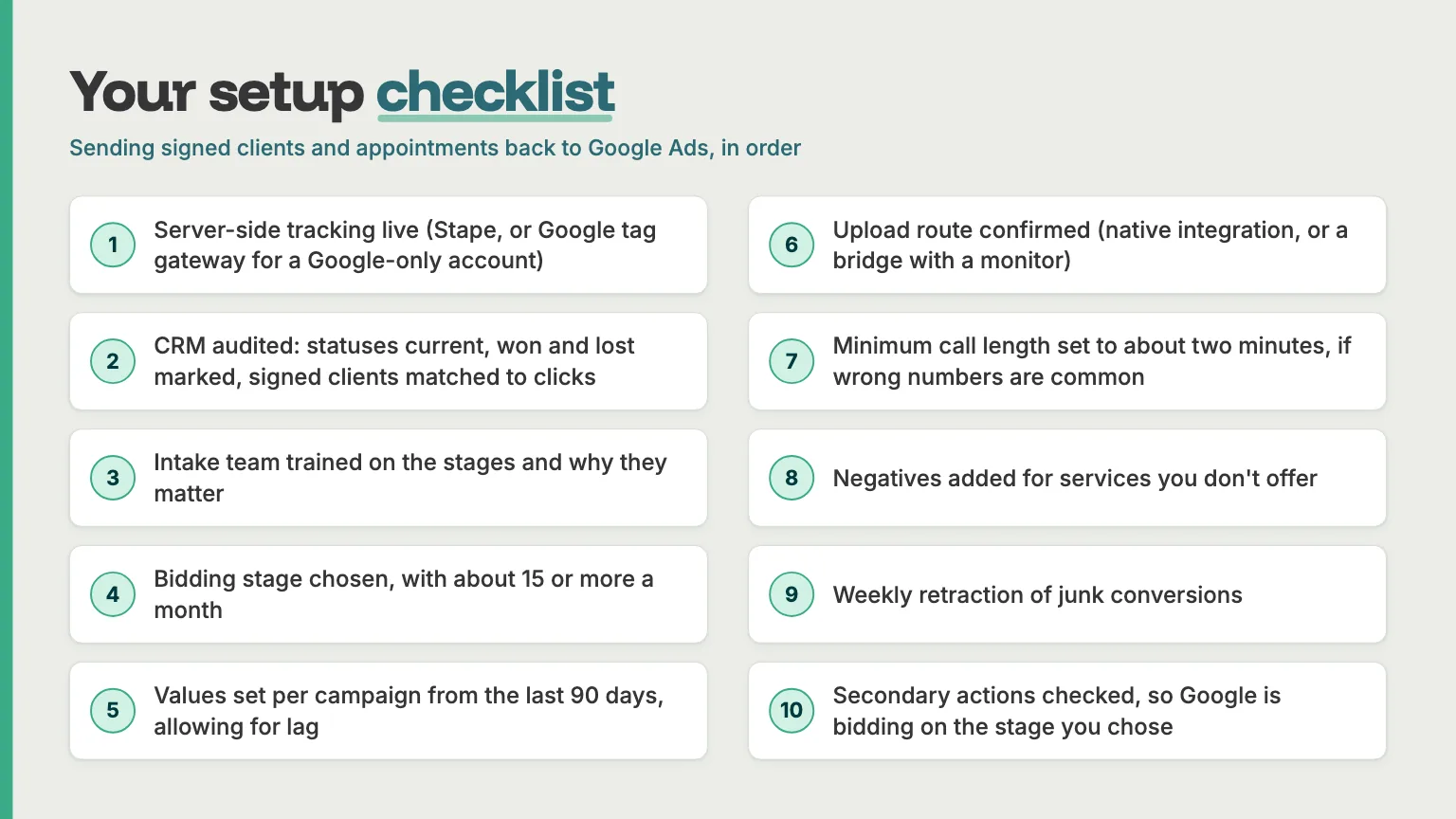
- Server-side tracking: Set up Stape or Google tag gateway for Google-only accounts.
- CRM data quality: Audit lead statuses, won and lost outcomes, and click attribution.
- Team training: Ensure everyone managing enquiries uses CRM stages consistently.
- Conversion stages: Choose a primary bidding stage with sufficient volume, ideally at least 15 conversions per month.
- Conversion values: Calculate values using 90 days of campaign data, allowing for conversion delays.
- CRM integration: Confirm your native integration or monitored bridge is working.
- Call tracking: Set a minimum call duration of around two minutes where irrelevant calls are common.
- Negative keywords: Exclude irrelevant searches for services your firm doesn't offer.
- Conversion adjustments: Review and retract invalid conversions regularly.
- Bidding settings: Check primary and secondary conversion actions to ensure Google is optimising towards the intended outcome.
Is your Google Ads account learning from the right leads?
For many law firms, conversion tracking stops at the initial enquiry. Google can see when someone calls or submits a form, but not whether they eventually become a client.
At Leadtree, we can review your existing conversion tracking and CRM data to identify what Google is currently optimising towards. We'll help you understand whether your account is ready for a CRM feedback loop or if there are gaps worth addressing first.
Our goal is simple: better data, smarter bidding and more valuable clients for your firm.
Book a time here: https://www.leadtree.agency/product/book-call